Digital Home Thoughts - News & Reviews for the Digital Home

Be sure to register in our forums and post your comments - we want to hear from you!


Zune Thoughts

Loading feed...

Apple Thoughts

Loading feed...

Laptop Thoughts

Loading feed...


All posts tagged "Windows Home Server"


Wednesday, January 7, 2009

First Look at New HP MediaSmart Server

Posted by Timothy Huber in "Digital Home Hardware & Accessories" @ 04:00 PM

http://www.wegotserved.co.uk/2008/1...r-ex487-part-1/

"As a result, as we look towards future versions of the platform, I think we’ll remember 2009 as the year that Windows Home Server began the transition from an excellent, if relatively worthy (read: slightly dull) file server, backup and remote access system to a sexier, more powerful home media hub - easier and more exciting to market both to the industry and end-users. That transition starts today with the announcement of two new HP MediaSmart Server models - the EX485 & EX487 (codenamed "Encore"). A home server design that will be familiar now to many but with new, powerful media sharing, streaming and management software built on top of the core OS that opens up the path to a new generation of home servers."
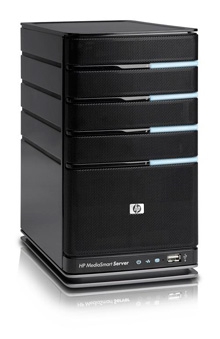
Over at We Got Served is a great review of the new HP MediaSmart Server line, running Windows Home Server. The hardware has been upgraded with a faster processor, more RAM, and more drive space. But the major enhancements are all in software including better media sharing and streaming support, online backup to Amazon, and full Mac support. I'm particularly interested in a media collection tool that scans your network for pictures, music and video, and copies it to the server. I have one of the first generation MediaSmart Servers and it's been one of the best technology purchases I've ever made. These new servers look to deliver even more.
Tuesday, December 30, 2008

HP Releases Two New MediaSmart Windows Home Servers

Posted by Jason Dunn in "Digital Home Hardware & Accessories" @ 01:30 PM

http://www.dailytech.com/HP+Release...rticle13798.htm

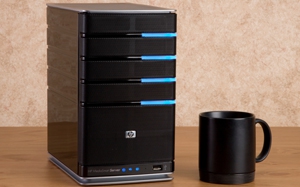
"To meet the backup needs for consumers who feast on a glut of digital content, HP has introduced a pair of new home media servers called the HP MediaSmart ex485 and ex487. The two devices share many of the same features and both use an Intel Celeron 2GHz CPU and 2GB of DDR2 RAM. Other features include HP specific applications that make managing and sharing digital content easier. Bundles software includes HP Media collector to copy and centralize digital files from across the network, media streaming to stream photos and music to network computers, iTunes server to share music libraries, and HP photo view and Photo Publisher services among others."

I've always liked the HP MediaSmart product, but I'm still rocking the (comparatively) power-guzzling home-built frankenbox that I put together for this purpose in 2007. If/when that computer dies, or I outgrow it somehow, I'll definitely switch to the HP MediaSmart - or possibly sooner, who knows. The new models are noticeably different in that they have four times the RAM, and a slightly faster CPU. Celeron is still a dirty word in tech circles, but the newer Celeron CPUs have a surprising amount of kick. So why the hardware upgrade? New software services that are coming to the Windows Home Server in the form of another software update (remember Power Pack 1?). HP's product spec page lists Mac backup support (without an asterix), "media collector", and "remote streaming". I know some of what's coming but due to NDA can't say much more than I'll be happy when these mentioned features arrive, because they'll fix my #1 source of irritation with the current WHS software.


Monday, November 10, 2008

Xbox 360 Video Support: It Still Sucks

Posted by Jason Dunn in "Digital Home Talk" @ 05:06 PM

I'm a big fan of the Xbox 360, but it sure is frustrating trying to use it to access all of my video content - I'm fighting my way through the transition from capturing and editing standard-definition video to high-definition video, and it's a bit of a struggle. I think very highly of H.264 as a compression format and have been using it to archive my content over the past year. Today I decided to put some effort into figuring out why my H.264 videos aren't showing up in my Xbox 360 when I browse for videos. At first I thought it was a matter of the H.264 videos I was creating not being in the right format - when you start digging into the guts of H.264 settings, you find a dizzying array of options, mostly around profiles. I found an Xbox team blog entry that said that H.264 support was limited to profile 4.1, and I'd encoded my H.264 test video as profile 4.2. But as I kept reading, I found the ugly truth: because my videos are stored on my Windows Home Server, the Xbox 360 will not play them back. What? Yeah, exactly. Read more...


Monday, July 28, 2008

Windows Home Server Power Pack 1: This Thing Rocks!

Posted by Jason Dunn in "Digital Home Talk" @ 01:00 PM

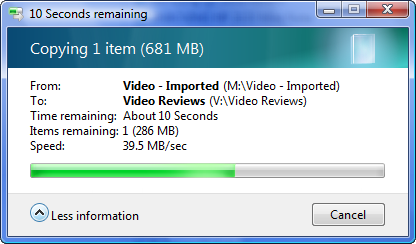
One of the biggest changes that the Power Pack 1 update ushered in was the way Windows Home Server deals with file duplication. Prior to the Power Pack 1 update, a few seconds after a file was copied over to the server, it would kick off the duplication process, copying the file to multiple locations. Seems good for protecting your data right? It is, but it had the nasty side-effect of dragging down the overall server performance. I'm running Gigabit Ethernet to and from my Windows Home Server, yet I'd often see read/write file speeds in the realm of 4 MB/s, which is brutally slow. After applying Power Pack 1, I've been seeing performance 10x faster - the screen shot below shows performance in the 40 MB/s range.

I've also seen improvements in the integrity of the backup database; I used to have a problem with the backup database getting corrupted, and my backups would cease to function properly. That problem hasn't recurred, and it's also fixed a user name/password login problem I was having. So, overall I'm quite happy with the performance of the update.

The one thing that hasn't gone smoothly is the Connector software update: there's a new version of the Connector software with the Power Pack 1 update, but the version of the software in the Home Server Connector Folder is still the old version. I've spent some time trying to sort the issue out, but no solution so far. Anyone else applied the Power Pack 1 update and seen this issue?


Wednesday, May 21, 2008

Windows Home Server Music Sputtering Issue

Posted by Jason Dunn in "Digital Home Talk" @ 11:00 PM

This likely doesn't impact many of you, but I wanted to share it anyway: if you're using Windows Home Server on a machine that you built yourself, you may have encountered an issue where listening to music using Windows Media Player 11 results in random pausing in the music - and it's inconsistent enough to make it really hard to track down. I've been running Windows Home Server for almost a year now, and quite like it, but that one issue was irritating enough to force me to stop using it for media streaming (it was causing frustration for my wife). There have been some very long discussion threads about it in the WHS forums, but the WHS team has thus far been unable to track it down. It seems to be isolated to home-built WHS boxes, not the commercial packages from HP and others. My "work around" was to use Foldershare to copy all 80 GB of my music from my media computer (not the WHS) to my wife's computer, and use Windows Media Player 11 to play it all locally. Talk about an ugly kludge!

Two weeks ago, I decided to switch my wife over to the Zune software for listening to music (more on that topic later from me), and guess what? Playing directly off the shared WHS drive, I saw zero problems - I've streamed music off it day after day, on multiple systems, and never had a problem with the music pausing. I don't know how or why this is, but it works and I'm suddenly much happier with my Windows Home Server.


Friday, March 7, 2008

Windows Home Server Connector Installation Problem Solved

Posted by Jason Dunn in "Digital Home Talk" @ 05:00 AM

http://forums.microsoft.com/Windows...iteID=50&mode=1

I've been running Windows Home Server for a while now, being one of the early beta testers, and for the most part I was quite impressed with the beta and RC1 versions of the software. When I got the final version and installed it though, things didn't work so well. My biggest problem was with the Connector software - the piece of software that you install on each PC, and that serves as the control point for your server, enables the back-up of that PC, etc. Well, the problem was that I simply couldn't get it installed on several of my PCs. I detailed the problem in this Windows Home Server Forum thread, but the short version was that I kept seeing this error message when trying to install the software:

An Error Occurred
This operation cannot be completed at this time.
Please try again later. If the problem persists, please contact window home server support


An error occurred? What kind of a useless haiku is that? No specifics, no details - who programmed that error dialogue, an Apple OS X developer? I'd put in my password for the server, and get that error - no other details were given about what was going wrong. Read more...


Wednesday, March 5, 2008

Windows Home Server Data Corruption Bug

Posted by Jason Dunn in "Digital Home News" @ 04:30 PM

http://www.wegotserved.co.uk/2008/0...affected-grows/

"Microsoft today updated KB 946676 which is the Knowledge Base article covering the Windows Home Server data corruption bug. This bug causes data to be corrupted when you try to edit or save certain files directly on the home server within certain applications. As well as fixing the original publication date of the article, worrying, Microsoft states that customers have reported data corruption occurring with a growing list of applications. I guess they have a responsibility to report the full list of issues reported - however, according to the article Microsoft has only reproduced the bug on certain applications within that list."


This post over at We Got Served is bit over a week old, but I thought it was worth sharing for any of you who are running Windows Home Server. In a nutshell, the core technology that makes Windows Home Server so cool (the automatic data mirroring) is also what makes it dangerous in this instance. I was a huge fan of WHS when I was beta-testing it, but after getting the final version and using it full-time for a few months, my enthusiasm for the product has greatly waned.

Why? Well, to start with the stability and robustness of the product is lacking. Twice now I've had corruption problems with my backups, forcing me to Remote Desktop into the WHS and hack around to get it fixed (which involves nuking all past backups). I see regular error messages about something going wrong with the server, and usually a simple reboot fixes the problem - just this week I wasn't able to log into the server with the WHS Connector clients. Whenever I tried, from any computer, I was told that the password I was using wasn't correct. Rebooting the WHS machine fixed this problem. Bizarre! I also no longer play music off the server because the audio stream would sputter and stutter every few minutes. The worst problem was my inability to get the Connector software installed on all my computers, which meant that several of them weren't being backed up. I found a solution just yesterday, which I'll be posting about separately (because it's just too important not to).

Here's hoping that the forthcoming Power Pack 1 will make some serious improvements to the product...


Featured Product

The Canon PowerShot S100 - The incredibly fun and small camera that offers you 12.1 megapixels with a bright f/2.0 lens and full 1080p video recording . MORE INFO

News Tip or Feedback?

Contact us

Thoughts Media Sites

Windows Phone Thoughts

Digital Home Thoughts

Zune Thoughts

Apple Thoughts

Laptop Thoughts

Android Thoughts

Reviews & Articles

Loading feed...

News

Loading feed...

Reviews & Articles

Loading feed...

News

Loading feed...

Reviews & Articles

Loading feed...

News

Loading feed...

Reviews & Articles

Loading feed...

News

Loading feed...

Reviews & Articles

Loading feed...

News

Loading feed...